
What Features should You Look for in Customs Broker Software?
Get to know the top 6 customs broker software features, from automated document processing to HS code classification, to simplify your brokerage operations.
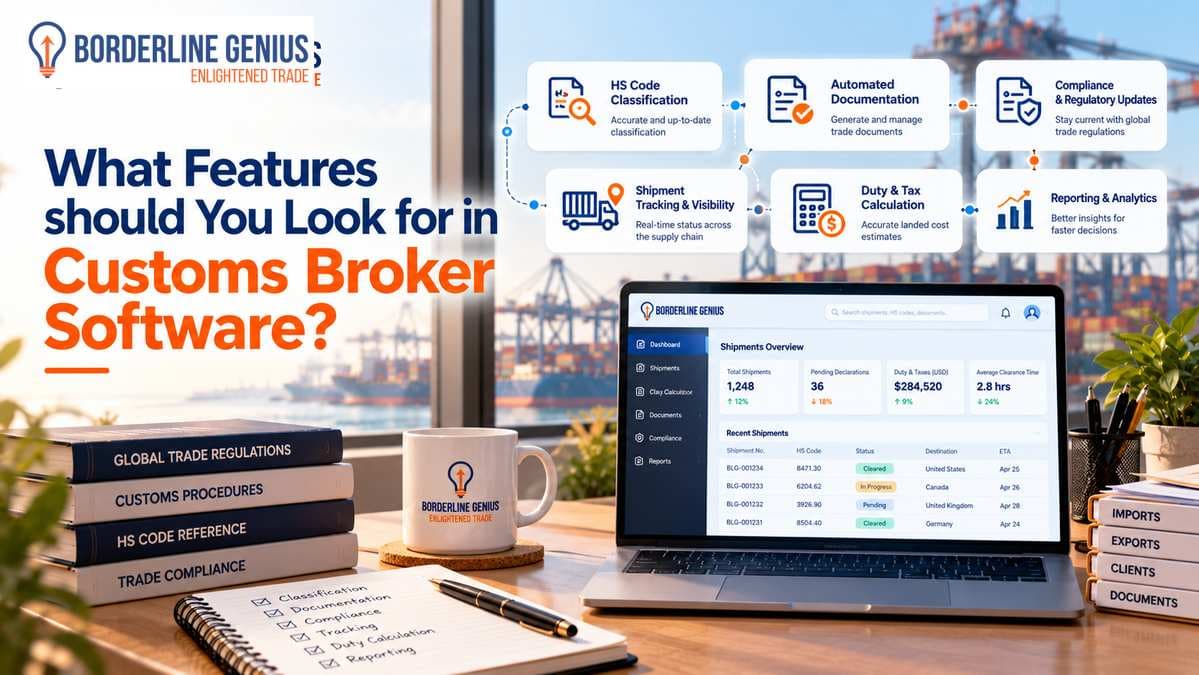
Customs broker software should offer automated document processing, HS code classification, and compliance checks as the core features. These features can help manage customs declarations accurately while reducing repetitive manual work. Therefore, when choosing the software, businesses should assess how each feature supports daily operations and regulatory requirements. The right platform can reduce data entry errors and improve coordination between teams. It can also assist brokers in maintaining reliable shipment records and responding to changing trade regulations. Evaluating these capabilities before purchasing software ensures that the right solution is selected that fits their operational needs and supports future growth.
Why Do Customs Brokers Need Specialized Software?
Essentially, customs brokers need specialized software because customs clearance requires accurate shipment data as well as compliance with regulations that vary by country and product. Manual processes can make it difficult to manage growing shipment volumes. Dedicated customs brokerage systems can enable organizing entry preparation and reducing repeated data entry across disconnected platforms.
-
Brokers also need the software to limit processing delays by automating repetitive document handling and data entry.
-
Their compliance teams can identify missing information before submitting customs declarations.
-
Through this, they can track shipment status and identify entries that need either correction or approval.
-
It can help them integrate tariff resources to verify classification codes and applicable duty rates.
Top 6 Customs Broker Software Features to Look for
Automating documentation and classifying HS codes are among the top customs broker software features. The others include compliance screening automation, integration of current systems, audit trails, and shipment visibility. They account for the main operational needs of brokers.
Let us take a closer look at these 6 features.
Automated Document Processing
When choosing software for customs brokers, the automation of document processing allows them to extract shipment information from commercial papers. They can do so without manually entering every field. Thus, repetitive work is reduced, and shipments are prepared with more efficiency.
-
Hence, the software should support commercial invoices, bills of lading, packing lists, purchase orders, as well as certificates of origin.
-
Also, it should handle scanned PDFs along with documents with different layouts.
Note that when evaluating this customs broker automation feature, it is important to check whether the system accurately identifies the main fields. Primarily, these include product descriptions, unit prices, quantities, and countries of origin. Carrying out human review can further help with unclear or incorrect extraction of information.
Classification of HS Codes
Software for customs brokerage should importantly have HS code classification features. They can help detect the appropriate tariff classification for the import of goods. In the United States, the Harmonized Tariff Schedule (HTS) provides the tariff classifications in use for imports.
-
Brokers should ensure that the customs broker software is supportive of research for classifying products.
-
It should retain validated classifications for recurring products.
-
In case automation is available, the system should feature confidence scores.
-
Moreover, it should review workflows to identify uncertain results.
Automation of Compliance Screening
As customs brokers file customs entries, they should know the regulatory requirements and potential restrictions that apply. For this, features like compliance screening automation are important.
-
Compliance screening enables finding out which regulatory requirements are applicable.
-
Through this, brokers can detect restrictions before filing customs entries.
-
It reduces dependence on manual checks while giving compliance teams a structured process for reviewing flagged issues.
Depending on the markets and inclusion of goods, the capabilities of this feature extend to denied-party screening, Partner Government Agency requirements, as well as checks for the relevant antidumping or countervailing duties.
Note that while the best customs brokerage software comes with compliance screening automation, one should verify which screening lists and regulatory requirements it covers. Automated alerts should facilitate qualified review rather than replace decisions that demand professional assessment.
Integration with Existing Systems
For customs brokerage software, the ability to integrate with the current systems is one of the key features to consider. It allows exchanging shipment information with the other systems in use for clearance. Without it, brokers may still need to enter the same information into various applications.
-
The customs broker software should have compatibility with existing brokerage or Automated Broker Interface (ABI) systems.
-
Beyond basic shipment details, it should transfer relevant entry details.
-
For US operations, check whether it supports the required electronic filing workflow through existing systems.
-
Also, check that the integration supports filing-status updates.
-
Lastly, see to it that its vendor maintains compatibility when the connected systems change.
Shipment Visibility and Reporting
Features such as shipment visibility and reporting make digital customs broker systems useful for understanding where an entry stands as well as which actions remain outstanding. With this information, brokers can prioritize corrections along with following up on declaration delays.
The reporting capabilities of the software, in specific, can include entry status, pending approvals, shipment release information, and processing performance. Brokers may additionally need reports showing which data fields invite frequent correction. Through these reports, they can identify recurring operational problems. The findings can support discussions with clients by providing a clearer account of processing progress and outstanding requirements.
Audit Trail Management
In customs brokerage, audit trails preserve records of the actions taken during customs entry preparation. They explain classification decisions and show the essential compliance checks performed.
While selecting the software for customs brokers, look for audit trail management features. The system should retain supporting documents, duty calculation details, screening results, and customs filing records. Version histories can additionally help brokers find out which information was used when a decision was made. These records can support internal reviews and retrieval of evidence during customs audits.
Which Customs Broker Software has the Best Features?
Customs broker software with the best features depends on a brokerage's shipment volume, compliance needs, and existing technology. Borderline Genius Inc. offers Genius Workspace, an AI-powered trade compliance platform designed to help businesses manage product classification and related processes. Its capabilities support customs brokers and trade professionals who need reliable product data and regulatory information to make informed decisions.
Key Capabilities of Genius Workspace
Accurate product classification is the core capability for customs brokers because it allows them to determine the applicable tariff treatment for goods to import. Genius Workspace facilitates classification-related work by providing access to trade intelligence and regulatory information. Thus, brokers can evaluate product details and make more informed decisions while classifying products.
-
Also, this customs brokerage automation system centralizes trade compliance activities.
-
It lets brokers manage product information and monitor requests without relying on disconnected spreadsheets or email threads.
-
The software connects classification, tariff intelligence, landed-cost calculations, and collaboration in one environment.
Endnote
Customs broker software should include features that support regular operations and reduce the time spent on repetitive or complex tasks. One should prioritize capabilities that address daily bottlenecks, minimize manual effort, and help in maintaining accuracy. The right features should make customs clearance more efficient without adding unnecessary complexity.
Frequently asked questions
Navigate Global Trade With Greater Confidence
Access expert guidance to help your organization address complex trade, classification, tariff, and compliance challenges.
Talk to a Trade ExpertRelated articles
Keep reading with more guidance on trade compliance and classification.
 Genius WorkspaceCustoms BrokersTrade Compliance5 min read
Choosing the Right Customs Broker Software in 2026
Find out how to choose the right customs broker software in 2026 by assessing essential features such as integrations, scalability, and reporting.
Read article Tariff GeniusTariffsTariff Management6 min read
Tariff Classification Software: Features for Faster, More Accurate Classification
Explore essential tariff classification software features that can help with higher accuracy and faster classification across products and markets.
Read article Customs BrokersTrade ComplianceGenius Workspace7 min read
What is Customs Broker Software?
Learn about customs broker software, its features, benefits, and role in managing customs transactions, documentation, duties, and shipment information.
Read article